

Let’s see what I can type while my digits threaten to fall off from the cold…
I’ll spare you the “Oh my word, another three weeks, wow, where did they go?” intro.
Things are slowly settling down again in our personal lives, and we’re easing back into the same energy we had at the start of the year. Although I’ll be honest, the urge to hibernate and eat my way through the pantry is strong. And the idea of sitting at my desk in the middle of winter, Wacom pen trembling between my fingers, is about as inviting as that cup of tea you forgot you made three hours ago.
But we press on. We prevail. We fill the tenth hot water bottle of the day. We type out updates with our ice cube fingers.
What We’ve Been Working On
(Megan) Artwise
My first order of business for this sprint was to complete the texturing of the Wall Screecher, which I had almost finished last time.
Behold it, in all its juicy, internal splendour:


It’s pretty gnarly… and trust me, the reference pictures I had to look at were worse. He’s just hanging around… waiting to meet you in the dark.
Once he was done, I figured it was time to bleach my eyes with something a little lighter, so I jumped back into some character portraits.

I’ve completed our first two character portraits from the Tezka Security Team. The full team consists of 11 members, though you’ll only encounter 3 of them in the demo we’re working on. And (spoiler alert) all of them are dead when you find them.
I won’t lie, painting their youngest team member started making me pretty depressed. Seeing his happy little face…knowing what his fate is. Ah, the pain fictional people can stir in a person.
In line with this, we have started assembling our group of voice actors and are slowly figuring out which characters we feel drawn to embody. None of us has professional experience when it comes to voicing and tackling emotionally charged scenes will definitely be a challenge. But I’m so excited to see what everyone brings to the table in the months to come.
(Harvey) Code Side
From If Statements to Abstract Elegance: Evolving Interaction Systems in Godot
When building interaction systems in Godot 4.4.1, it’s tempting to start with a simple if-based branching structure. After all, early on, you’re usually just trying to get things working. But as your game grows and more interactable elements are introduced — terminals, pickups, levers, placements, doors — that simple structure starts to fracture.
Recently, I refactored my interaction system from a brittle set of type checks into a clean, modular system using an abstract base class pattern, even though Godot doesn’t enforce abstract classes. And I want to walk you through why this decision saved my codebase from a lot of pain down the line.
The Problem: Branching Chaos
Here’s a simplified version of what my interaction code looked like before:
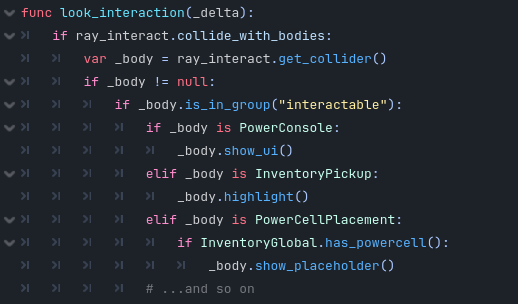
This got ugly, fast. Every new type of object forced me to come back and modify this function, and I was violating the Open/Closed Principle: code should be open to extension but closed to modification.
The Shift: Abstract Interaction
To solve this, I created a base class called Interactable. Even though Godot doesn’t support true abstract classes, you can simulate it by creating stub methods that child classes are expected to override.
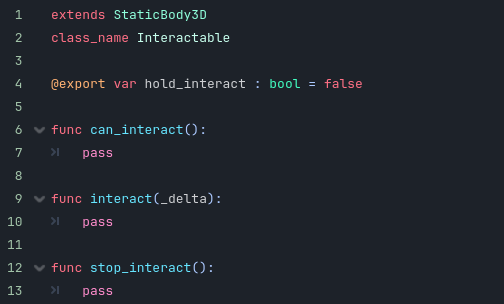
This gave every interactable object a consistent interface. More importantly, it decoupled the interaction system from specific implementations.
The New Interaction System
Now, the look_interaction() function is simple, powerful, and doesn’t care what object it’s looking at — only that it behaves like an Interactable:
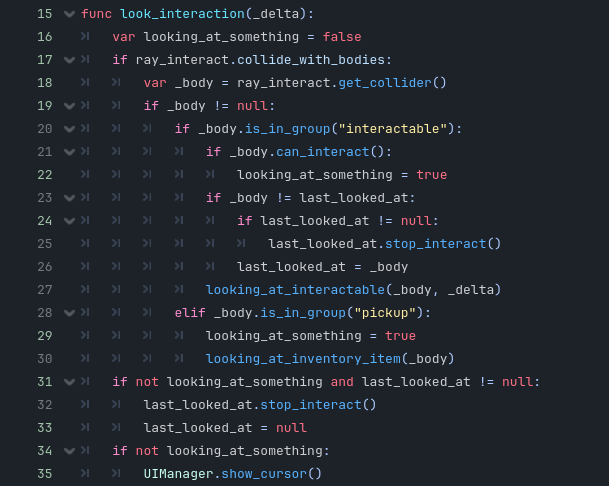
Why This Pattern Rocks
- Scalability
Add a new type of interactable — like a readable note or magical portal — and all you have to do is subclass Interactable. No central code needs to change. - Encapsulation
Logic like “can I interact with the object?” lives inside the relevant object, not the interaction controller. - Mock Abstraction in Godot
Godot doesn’t enforce abstract methods, but by convention, I define stub methods in the base class. This makes it easy to spot missing implementations and keeps everything aligned.
Visual Feedback Hooks
Having on_looked_at() and on_look_exit() lets you control things like outlines, glow, tooltips, or sound in a clean, modular way.
Pro Tip: Editor Warnings
To avoid forgetting to implement something, you can even add this to your base class:

Or use assertions:

This is a poor man’s abstract enforcement, but it works.
Final Thoughts
Whether you’re working solo or with a team, adopting abstract base classes — even in engines that don’t enforce them — brings clarity and order to growing codebases. Your future self (or teammate) will thank you.
The result? Cleaner code, fewer bugs, and the confidence to scale.
What’s Next?
Art (Megan):
- Portrait Art – Finishing the portrait art for the third Tezka Security Team member.
- Creature Model – I need to model and texture the third creature the player will encounter.
- Animation – I really want to work on the animated loading screen asap.
Mechanics/Development (Harvey):
Level Manager System
Begin designing and implementing a Level Manager that maintains the state of the environment as the player navigates through it. This includes:
- Persisting the status of doors (open/closed)
- Tracking pickup items (collected or still in the world)
- Ensuring consistent world state across player movement, respawns, or save/load events
This system will serve as the foundation for future level persistence and state serialisation.
Procedural Object Spawner
Explore and plan out a system for procedural item spawning. The goal is to inject replayability and variation into levels without breaking balance or narrative consistency.
Key considerations:
- Prevent duplicate spawns or player exploits
- Ensure items spawn only in valid, visible, or logical locations
- Maintain deterministic behaviour when needed (e.g., seeds for debugging)
This system has the potential to impact game flow significantly, so planning and small-scale prototyping will be prioritised before full implementation.